
Guest It Welcome · Short-term rentals
Scan the code. Everything's there.
A digital guest guide for holiday lets and short-term rentals: wifi, arrival, house rules, how the stove works and where to eat. Guests scan the QR code on the wall, or open the link you send before they arrive, and it opens in their phone browser. Nothing to download.
Works with Airbnb, Vrbo and Booking.com listings. Built in West Yorkshire.
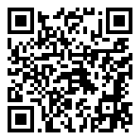 Point your phone's camera here
A real guide, not a mock-up.
Gull Cottage is a fictional cottage in Whitby with a real guide. Open it on your phone, copy the wifi password, read how the stove works. That is what your guests get.
Ask its concierge where the stopcock is and it answers from the guide. Ask for a refund and it hands you to the host instead of guessing.
Or scan the code on the card with your phone. It's a demo, so messages to its host aren't sent to anyone. What we do with what you type in the demo.
How it works
Three steps. Nothing to install.
-
1
Build the guide.
Write it in the editor, or upload the house manual you already have, as PDF, Word or text, and the AI sorts it into sections. Every code and number must match the original or it is flagged for you to check. Nothing changes in your guide until you have checked the draft. We read your manual once to draft the sections and don't keep the file.
-
2
Put the QR code where guests look.
Print the QR code from your dashboard and put it by the kettle or in the hall, wherever guests stand when they need something. Send guests the guide's link before they arrive, or export the whole guide as a PDF. NFC plaques are coming soon.
-
3
Guests scan.
iPhone or Android, no app, no download: the phone's camera opens the guide. The wifi password copies in one tap. Change a section and the next guest sees the new version.
What's in a guide
Eight sections, each with photos if you want them. Drag them into the order that suits the house. Pick an accent colour. Print the QR code, or export the whole guide as a PDF.
Arrival and access
Directions, parking, key safe, door codes.
Wifi
Network and password, copied to the guest's clipboard in one tap.
House rules
Noise, pets, smoking, bins, the things you would rather not repeat.
Appliances
The stove, the heating, the hot water, the television.
Local guide
Where to eat, where to walk, the shop that opens on a Sunday.
Safety and registration
Fire safety, the fuse box, the stopcock, and your registration or licence number where your area needs one.
Emergencies
Your number, the nearest hospital, who to call when you are not answering.
Checkout
Time, keys, bins, what to leave where.
Add-ons
Two things a laminated sheet cannot do.
Hear about problems before the review does
A short private form on the guide. An email to you when it is filled in, and a daily digest. Your review links are shown to every guest afterwards, not only the happy ones.
Answers at 11pm, from your own guide
Guests ask where the stopcock is and get an answer drawn from your guide and your notes. When it isn't sure, it says so and points guests to you. Money, refund and booking questions are handed to you, with your contact details. Daily and monthly limits keep the cost known.
Pricing
Monthly, cancel from your dashboard. 14-day free trial on everything.
£9 a month
The guest guide for your holiday lets, with 2 properties included.
- Guest guide: arrival, wifi, house rules, local guide, checkout
- Build it from your house manual with AI, or write it yourself
- Printable QR code and a PDF of the guide. No app for guests
- 2 properties included, then £5 a month each
- Hosts dashboard
£4 a month
Private guest feedback on the guide: hear about problems before the review does.
- Private feedback form on every guide
- Email on new feedback, daily digest
- Per-property results and trends
- Review links shown to every guest
£7 a month
An AI concierge that answers guests' questions from your guide and your notes.
- Answers drawn from your guide and your notes
- Tells guests to contact you when it isn't sure
- Usage meter per property
Extra properties: £5 a month each, beyond the 2 included. Add them from your dashboard when you need them.
Print the QR code and a PDF of the guide from your dashboard; there's nothing else to buy.
Prices are final: the price you see is the price you pay. Full terms.
Questions
Do you connect to my Airbnb account?
What do my guests need?
Who can see my guide?
Will the AI invent things about my property?
What happens if I cancel?
What if a payment fails?
I've got more than a couple of properties.
Airbnb, Vrbo and Booking.com are trademarks of their owners. Guest It isn't affiliated with or endorsed by them.
Waitlist
Be first on the wall.
Welcome is not open yet. Leave your email and we will send one message when it is.
You're on the list.
We will email you when Welcome opens.